If you prefer to manually write your SQL query, use the Manual Query page, which displays the following components:
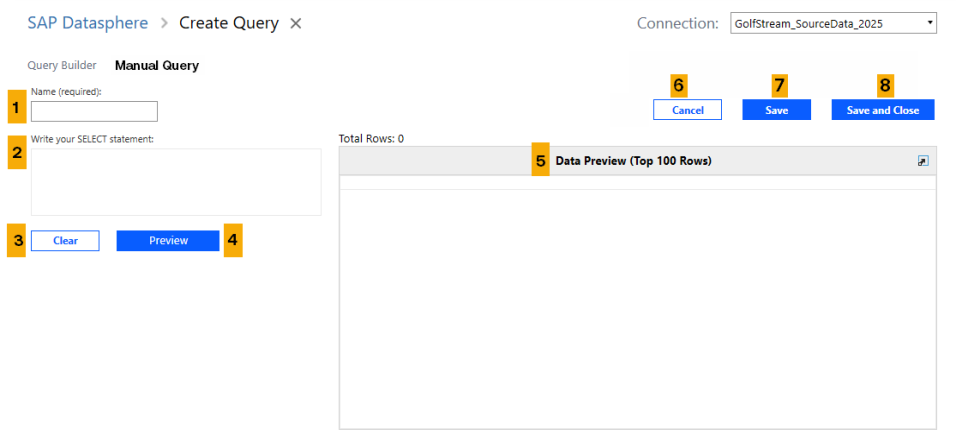
The Manual Query tab consists of the following components:
-
Name: A text box to enter a name for your query.
-
Write your SELECT statement: A text box to enter your SQL query.
-
Clear: Click this button to clear your SELECT statement and start again.
-
Preview Button: Click this button to view a preview of your data in grid form.
NOTE: Only valid queries will render a preview.
-
Data Preview: This area displays the filtered results of your query, in grid form, after you hit the Preview button. The preview only displays the top 100 records.
- Cancel: Exit the Create Query page. Unsaved changes will be lost.
-
Save: When clicked, your query will be saved and you remain on the Create Query page.
-
Save and Close: When clicked, the query will save and you will return to the Datasphere Queries page.
Use the Manual Query Page
IMPORTANT: If you begin writing your query manually and switch to the Query Builder tab, your query remains in the Manual Query tab, but the contents do not transfer to the Query Builder tab.
To write the query, use these steps:
-
In the Name field, enter a name for your query.
-
In the text box below Write your SELECT statement manually, write your query. OneStream recommends referring to the list of suggested logical connectors and operators when writing your query. See Suggested Booleans and Suggested Operators.
-
Click the Preview button at any time to preview the results of your query.
NOTE: Only valid queries will render a preview.
-
When done, click the Save Query button to save your query to the Datasphere Queries table. Click the Cancel button to exit the Manual Query page without saving.
Suggested Booleans
-
And
-
Or
-
Not and
-
Not or
Suggested Operators
| Operator | Description |
|---|---|
| + |
Addition |
| - | Subtraction |
| * | Multiplication |
| / | Division |
| AND | Logical conjunction |
| OR | Logical disjunction |
| NOT | Logical negation |
| | | | Concatenation |
| < | Less than |
| > | Greater than |
| = | Equal |
| != | Not equal |
| <= | Less than or equal |
| >= | Greater than or equal |
| LIKE | Value similar to |
| IS NULL | Value does not exist |
| BETWEEN | Value between two other values |
| ( ) | Parentheses |


